1891.uy - Documentación
Español
1891.uy es un conector de Model Context Protocol (MCP) que permite a asistentes de IA consultar la historia del Club Atlético Peñarol: partidos, jugadores, entrenadores, presidentes, torneos, títulos, clásicos y récords.
- Acceso: solo lectura, datos públicos.
- Fuente: base de datos oficial de la Comisión de Historia y Patrimonio Histórico del Club Atlético Peñarol (https://1891.uy).
- Atribución: cada respuesta cita "1891.uy" como fuente.
Cómo conectarlo
El conector es un servidor MCP remoto (transporte Streamable HTTP). Para usarlo:
- En tu cliente compatible con MCP (por ejemplo Claude), abrí Configuración → Conectores.
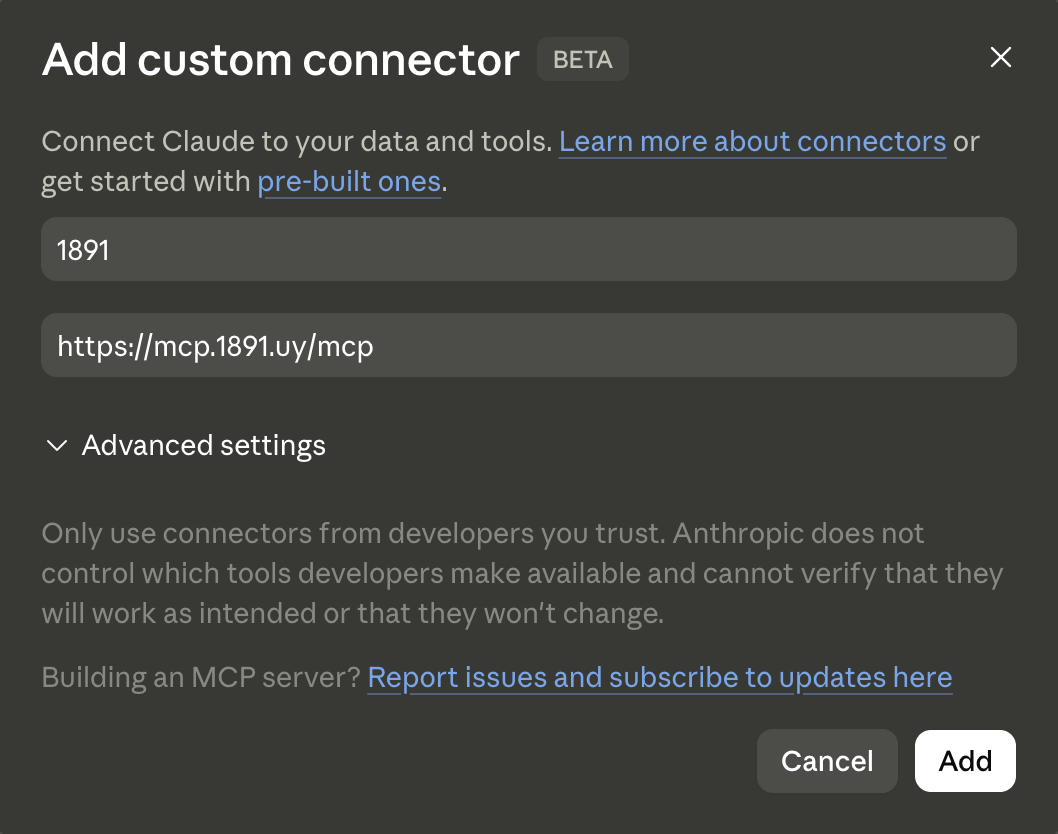
- Elegí Agregar conector personalizado.
-
Ingresá la URL del servidor terminada en
/mcp:https://mcp.1891.uy/mcp - Confirmá. El conector no requiere autenticación: es de solo lectura sobre datos públicos.
- Iniciá una conversación nueva y preguntá sobre la historia de Peñarol.
También podés ir a Buscar conectores en tu cliente y buscar 1891.uy para agregarlo desde el directorio.
Verificación rápida: https://mcp.1891.uy/ping debe responder pong.
Ejemplos de uso
"¿Cómo nos fue en los últimos 10 partidos?"
El conector trae los partidos más recientes con marcador, rival, torneo y estadio.
"Contame la trayectoria de Fernando Morena en Peñarol"
Busca al jugador, trae su perfil con estadísticas y, en clientes compatibles, lo muestra en una ficha interactiva.
"¿Qué pasó un día como hoy en la historia de Peñarol?"
Devuelve todos los partidos jugados ese mes-día a lo largo de los años.
"¿Cuántas Libertadores ganó Peñarol y en qué años?"
Lista los títulos con el detalle de cada edición.
Herramientas disponibles
| Herramienta | Descripción |
|---|---|
find_player | Buscar jugadores por nombre, posición, país, etc. |
get_player | Perfil de un jugador (estadísticas, biografía, títulos). Ficha interactiva en clientes compatibles. |
get_player_matches | Historial de partidos de un jugador con filtros. |
find_coaches | Buscar entrenadores. |
get_coach | Perfil de un entrenador. Ficha interactiva en clientes compatibles. |
get_coach_matches | Historial de partidos dirigidos por un entrenador. |
find_presidents | Lista de presidentes con sus períodos. |
get_president | Ficha de un presidente (datos personales y años de mandato). Ficha interactiva en clientes compatibles. |
find_person | Buscar una persona por nombre en todas las entidades a la vez y obtener el o los roles que tuvo en la institución (jugador, entrenador, presidente, árbitro, fundador). |
find_matches | Buscar partidos por fecha, rival, torneo, árbitro, condición, etc. |
get_match | Detalle de un partido (alineaciones, goles, árbitros). Ficha interactiva en clientes compatibles. |
get_head_to_head | Histórico de Peñarol contra un rival. |
find_tournaments | Buscar campeonatos. |
get_tournament | Resumen de una edición de torneo (cabecera, stats, partidos). |
get_tournament_matches | Partidos de una edición específica de un torneo. |
get_tournament_players | Plantel de una edición de torneo. |
find_titles | Listar títulos ganados por Peñarol. |
on_this_day | Partidos jugados un mes-día determinado a lo largo de la historia. |
get_home_overview | Panel de hoy: últimos partidos, efemérides del día, cumpleaños. |
get_stats_top | Rankings: goleadores, más partidos, más victorias, clásicos. |
find_records | Récords históricos del club (goleadas, rachas invictas, marcas de vallas invictas). |
find_events | Hitos fundacionales y fechas señaladas de la historia del club. |
find_founders | Lista de los fundadores del club con su nacionalidad. |
find_articles | Artículos documentales de la Comisión publicados en 1891.uy (la fundación de 1891 y el decanato, el origen del nombre, los Campeonatos Uruguayos de 1924 y 1926). |
get_article | Texto completo de un artículo por secciones, con las imágenes de actas, prensa de época y documentos escaneados. |
find_filter_options | Catálogos de IDs para filtros (posiciones, torneos, rivales, estadios, árbitros, etc.). |
Todas las herramientas son de solo lectura (readOnlyHint: true). Ninguna modifica datos.
Solución de problemas
El conector no aparece o no conecta
- Verificá que la URL termine en
/mcpy usehttps://. - Probá
https://mcp.1891.uy/pingen el navegador: debe devolverpong. Si no responde, el servicio puede estar temporalmente caído.
"No se encontraron resultados"
- Probá una búsqueda más amplia (por apellido en lugar del nombre completo).
- Recordá que la base cubre la historia de Peñarol; consultas sobre otros clubes no devuelven datos.
Aparece el error "Rate limit exceeded" (HTTP 429)
- El servicio aplica un límite de solicitudes. Esperá unos segundos (el header
Retry-Afterindica cuánto) y reintentá.
La ficha interactiva no se renderiza
- El render de fichas (jugador, entrenador, partido) requiere un cliente con soporte de MCP Apps. En clientes sin ese soporte, los mismos datos se devuelven como texto/JSON y la consulta funciona igual.
Más ayuda
Escribinos a oficialhistoriacap@gmail.com.
English
1891.uy is a Model Context Protocol (MCP) connector that lets AI assistants query the history of Club Atlético Peñarol: matches, players, coaches, presidents, tournaments, titles, derbies, and records.
- Access: read-only, public data.
- Source: the official database of the Comisión de Historia y Patrimonio Histórico del Club Atlético Peñarol (https://1891.uy).
- Attribution: every response cites "1891.uy" as its source.
How to connect
The connector is a remote MCP server (Streamable HTTP transport). To use it:
- In your MCP-compatible client (e.g. Claude), open Settings → Connectors.
- Choose Add custom connector.
-
Enter the server URL ending in
/mcp:https://mcp.1891.uy/mcp - Confirm. The connector requires no authentication: it is read-only over public data.
- Start a new conversation and ask about Peñarol's history.
You can also open Browse connectors in your client and search for 1891.uy to add it from the directory.
Quick check: https://mcp.1891.uy/ping must respond pong.
Usage examples
"How have we done in the last 10 matches?"
The connector returns the most recent matches with score, opponent, tournament, and stadium.
"Tell me about Fernando Morena's career at Peñarol"
It searches the player, fetches the profile with statistics, and — in compatible clients — renders it as an interactive card.
"What happened on a day like today in Peñarol's history?"
Returns every match played on that month-day across the years.
"How many Libertadores did Peñarol win, and in which years?"
Lists the titles with the detail of each edition.
Available tools
| Tool | Description |
|---|---|
find_player | Search players by name, position, country, etc. |
get_player | Player profile (stats, biography, titles). Interactive card in compatible clients. |
get_player_matches | A player's match history with filters. |
find_coaches | Search head coaches. |
get_coach | Coach profile. Interactive card in compatible clients. |
get_coach_matches | Match history managed by a coach. |
find_presidents | List of presidents with their terms. |
get_president | President profile (personal data and years served). Interactive card in compatible clients. |
find_person | Search a person by name across every people entity at once and get the role or roles they held at the club (player, coach, president, referee, founder). |
find_matches | Search matches by date, rival, tournament, referee, condition, etc. |
get_match | Match detail (lineups, goals, referees). Interactive card in compatible clients. |
get_head_to_head | Peñarol's historical record against a rival. |
find_tournaments | Search tournaments. |
get_tournament | Overview of a tournament edition (header, stats, matches). |
get_tournament_matches | Matches of a specific tournament edition. |
get_tournament_players | Roster of a tournament edition. |
find_titles | List titles won by Peñarol. |
on_this_day | Matches played on a given month-day throughout history. |
get_home_overview | Today's panel: latest matches, today's milestones, birthdays. |
get_stats_top | Rankings: scorers, most matches, most wins, derbies. |
find_records | The club's historical records (record wins, unbeaten runs, goalkeeper clean-sheet marks). |
find_events | Founding milestones and landmark dates in the club's history. |
find_founders | List of the club's founders with their nationality. |
find_articles | Documentary articles by the Comisión published on 1891.uy (the 1891 foundation and the "decano" question, the origin of the name, the 1924 and 1926 Uruguayan championships). |
get_article | Full text of one article by sections, with images of scanned minutes, period press and documents. |
find_filter_options | ID catalogs for filters (positions, tournaments, rivals, stadiums, referees, etc.). |
All tools are read-only (readOnlyHint: true). None modify data.
Troubleshooting
The connector doesn't appear or won't connect
- Make sure the URL ends in
/mcpand useshttps://. - Try
https://mcp.1891.uy/pingin the browser: it must returnpong. If it doesn't respond, the service may be temporarily down.
"No results found"
- Try a broader search (last name instead of full name).
- Remember the database covers Peñarol's history; queries about other clubs return no data.
"Rate limit exceeded" error (HTTP 429)
- The service enforces a request limit. Wait a few seconds (the
Retry-Afterheader indicates how long) and retry.
The interactive card doesn't render
- Rendering the cards (player, coach, match) requires a client with MCP Apps support. In clients without it, the same data is returned as text/JSON and the query works all the same.
More help
Write to us at oficialhistoriacap@gmail.com.